Module 5: Monitoring and troubleshooting
Coolstuff Store’s pipeline is running. The 3-stage workflow — clone, build, summarize — completes successfully and your manager has signed off on the approach. But before handing this over to the team, there’s one question left: "What happens when it breaks, and how do we know it’s broken?"
In this final module, you’ll learn how to monitor pipeline runs using both the CLI and the OpenShift console, and you’ll deliberately introduce a failure to practice the diagnostic workflow that Coolstuff Store’s team will use in production.
|
Throughout this workshop you have created Tekton resources by applying YAML files from the terminal and using the OpenShift Pipelines console. This hands-on approach is ideal for learning and exploring concepts — it gives you direct feedback and lets you iterate quickly. In production, however, teams typically manage pipeline definitions differently. Storing your Task, Pipeline, and Repository definitions in a Git repository alongside your application code gives you versioning, peer review through pull requests, and a full audit trail of every change. Using a GitOps tool like Red Hat OpenShift GitOps (Argo CD) to synchronize those definitions to the cluster means the cluster state is always a reflection of what is in Git — no manual oc apply commands, no configuration drift, and a clear rollback path if something goes wrong. For teams managing multiple environments or multiple pipelines, this consistency becomes essential.You already took a step in this direction in Module 4: the .tekton/ directory in your Gitea repository is your pipeline definition living in Git. Pipelines as Code extends this by making Git the trigger for pipeline execution. The next step is using OpenShift GitOps to manage the cluster-side resources — the Tasks, the Repository CRD, and the Secrets — with the same discipline.
|
Learning objectives
By the end of this module, you’ll be able to:
-
Monitor running and completed PipelineRuns using
tknandoccommands -
Interpret pipeline status conditions and identify which stage failed
-
Read step-level logs to find the root cause of a failure
-
Fix a broken pipeline and confirm recovery with a successful re-run
Exercise 1: Monitor pipeline status with CLI and console tools
The pipeline runs from Module 3 are still in the cluster. In this exercise, you’ll use the monitoring tools that Coolstuff Store’s team will use daily to check pipeline health and investigate past runs.
-
In the Terminal tab, confirm you are in the correct project:
oc project tekton-workshop-%OPENSHIFT_USERNAME% -
We will manually create a named PipelineRun and execute it, to make it easier to follow up in these exercises.
-
Create the PipelineRun definition:
cat > coolstuff-pipelinerun-02.yaml << 'EOF'
apiVersion: tekton.dev/v1
kind: PipelineRun
metadata:
  name: coolstuff-pipeline-run-02
spec:
  pipelineRef:
    name: coolstuff-build-pipeline
  params:
    - name: app-name
      value: "coolstuff-store-frontend"
    - name: app-version
      value: "3.0.0"
  workspaces:
    - name: shared-data
      persistentVolumeClaim:
        claimName: workshop-pvc
EOF
-
-
Apply the PipelineRun:
oc apply -f coolstuff-pipelinerun-02.yaml -
Now list all PipelineRuns in the project and check their status:
tkn pipelinerun listExpected output:
NAME                              STARTED          DURATION   STATUS
coolstuff-build-push-sje33k       5 minutes ago    48s        Succeeded
coolstuff-build-pipeline-xnj10j   10 minutes ago   35s        Succeeded
coolstuff-pipeline-run-02         20 minutes ago   ---        Running
coolstuff-pipeline-run-01         25 minutes ago   40s        Succeeded
...
-
Wait until the PiplineRun has finished then inspect the full status of
coolstuff-pipeline-run-02. This shows which Task ran in which order and how long each took:tkn pipelinerun describe coolstuff-pipeline-run-02Expected output includes:
Name:               coolstuff-pipeline-run-02
...
🌡️ Status
STARTED              DURATION   STATUS
25 minutes ago       35s.       Succeeded
...
TaskRuns
 NAME                                     TASK NAME      STARTED          DURATION   STATUS
 coolstuff-pipeline-run-02--summarize     summarize      9 minutes ago    6s         Succeeded
 coolstuff-pipeline-run-02--build         build          9 minutes ago    10s        Succeeded
 coolstuff-pipeline-run-02--git-clone     git-clone      10 minutes ago   30s        Succeeded
-
List the Kubernetes pods that were created by the PipelineRun. Each TaskRun creates 1 pod:
oc get pods -l tekton.dev/pipelineRun=coolstuff-pipeline-run-02Expected output:
NAME                                            READY   STATUS      RESTARTS   AGE
coolstuff-pipeline-run-02-build-pod             0/3     Completed   0          3m18s
coolstuff-pipeline-run-02-git-clone-pod         0/1     Completed   0          3m33s
coolstuff-pipeline-run-02-summarize-pod         0/1     Completed   0          3m8s
Tekton pods show Completed(notRunning) after a task finishes. This is expected behavior — the pod is retained to allow log retrieval. -
Retrieve logs for the
summarizetask step specifically:tkn pipelinerun logs coolstuff-pipeline-run-02 -t summarizeThe
-tflag filters logs to a single task name. This is useful when a pipeline has many tasks and you only need to check 1. -
View recent cluster events sorted by timestamp to catch infrastructure-level issues:
oc get events --sort-by='.lastTimestamp' | tail -20 -
In the OpenShift console, navigate to Pipelines, then Click Pipelines and select
coolstuff-build-pipeline. Click PipelineRuns to see a list of all runs with their status, duration, and start time. -
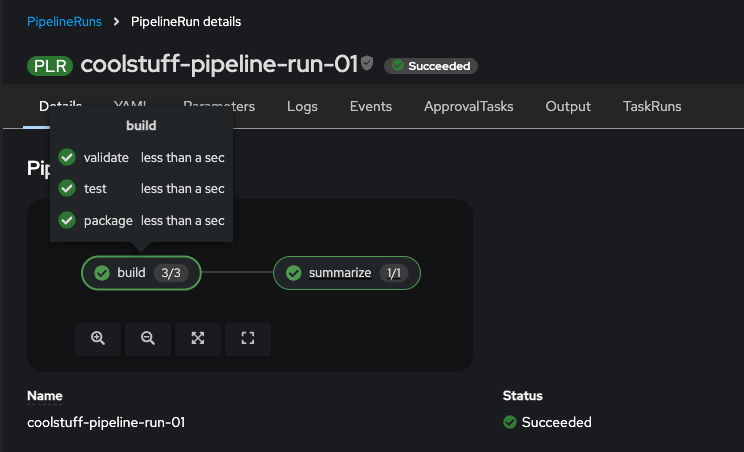
Click
coolstuff-pipeline-run-02to open the pipeline graph. Each node shows its status icon and duration. Hover over a node(e.g. build) to see its TaskRun name(validate, test, package) and timing details.
Verify
-
Confirm you can retrieve task-level information from the CLI:
tkn pipelinerun describe coolstuff-pipeline-run-02 -o jsonpath='{range .status.childReferences[*]}{.pipelineTaskName}{"\n"}{end}'All Tasks are listed from the pipeline.
-
Check status of each Task:
tkn taskrun list -o json | jq -r --arg pr "coolstuff-pipeline-run-02" '.items[] | select(.metadata.labels["tekton.dev/pipelineRun"] == $pr) | [(.metadata.labels["tekton.dev/pipelineTask"] // "-"),(.status.conditions[0].status // "-"),(.status.conditions[0].reason // "-")] | @tsv' | column -t-
Each task name is listed with its status reason
-
All tasks show
Succeeded -
You can also draw more details using tkn to get Tasks and it’s steps:
tkn taskrun list -o json | jq -r --arg pr "coolstuff-pipeline-run-02" '.items[] | select(.metadata.labels["tekton.dev/pipelineRun"] == $pr) | "Task: \(.metadata.labels["tekton.dev/pipelineTask"]) [\(.status.conditions[0].status) / \(.status.conditions[0].reason)]",(.status.steps[]? | " step: \(.name) → \(.terminated.reason // "Running")")'Expected output:
Task: summarize  [True / Succeeded]
  step: summarize  → Completed
Task: build  [True / Succeeded]
  step: validate  → Completed
  step: test  → Completed
  step: package  → Completed
Task: git-clone  [True / Succeeded]
  step: prepare-and-run  → Completed
Exercise 2: Diagnose and fix a failing pipeline run
Knowing how to monitor a healthy pipeline is half the skill. The other half is diagnosing failures. In this exercise, you’ll create a pipeline that has a missing Task definition — a realistic mistake that happens when a team adds a new pipeline stage before the underlying Task is written.
Create a pipeline with a missing Task reference
-
Create a
coolstuff-full-pipelinePipeline. It references adeploy-coolstuff-appTask that does not exist yet. This simulates what happens when a pipeline is updated before all its Task definitions are in place:cat > coolstuff-full-pipeline.yaml << 'EOF' apiVersion: tekton.dev/v1 kind: Pipeline metadata: name: coolstuff-full-pipeline spec: params: - name: app-name type: string default: "coolstuff-store-app" - name: app-version type: string default: "1.0.0" workspaces: - name: shared-data tasks: - name: build taskRef: name: build-coolstuff-app params: - name: app-name value: $(params.app-name) - name: app-version value: $(params.app-version) workspaces: - name: source workspace: shared-data - name: deploy runAfter: - build taskRef: name: deploy-coolstuff-app params: - name: app-name value: $(params.app-name) - name: app-version value: $(params.app-version) EOF -
Apply the Pipeline:
oc apply -f coolstuff-full-pipeline.yamlExpected output:
pipeline.tekton.dev/coolstuff-full-pipeline created
OpenShift Pipelines does not validate Task references at pipeline creation time. The error surfaces only when a PipelineRun tries to execute the missing Task. -
Create a PipelineRun against this pipeline:
cat > coolstuff-run-fail.yaml << 'EOF'
apiVersion: tekton.dev/v1
kind: PipelineRun
metadata:
  name: coolstuff-full-run-01
spec:
  pipelineRef:
    name: coolstuff-full-pipeline
  params:
    - name: app-name
      value: "coolstuff-store-checkout"
    - name: app-version
      value: "1.0.0"
  workspaces:
    - name: shared-data
      emptyDir: {}
EOF
This run uses emptyDiras the workspace backing. This is useful for short-lived or disposable runs where durable storage is not needed, and avoids conflicts with theworkshop-pvcPVC used in previous exercises. -
Apply the PipelineRun:
oc apply -f coolstuff-run-fail.yaml -
Watch the status update in real time:
oc get pipelinerun coolstuff-full-run-01 -wExpected output:
NAME                    SUCCEEDED   REASON           STARTTIME   COMPLETIONTIME
coolstuff-full-run-01   False       CouldntGetTask   22s         22s
Press
Ctrl+Conce the status showsFalse. Notice that the state is set to Succeeded False.
Diagnose the failure
-
List all PipelineRuns to confirm the failed status:
tkn pipelinerun listExpected output:
NAME                         STARTED          DURATION   STATUS
coolstuff-full-run-01        1 minute ago     46s        Failed
coolstuff-pipeline-run-02    20 minutes ago   2m30s      Succeeded
...
Verify
-
Describe the failed PipelineRun to identify which task failed and why:
tkn pipelinerun describe coolstuff-full-run-01Expected output includes:
...
🌡️  Status

STARTED         DURATION   STATUS
3 minutes ago   0s         Failed(CouldntGetTask)

💌 Message

Pipeline tekton-workshop-user1/coolstuff-full-pipeline can't be Run; it contains Tasks that don't exist: Couldn't retrieve Task "deploy-coolstuff-app": tasks.tekton.dev "deploy-coolstuff-app" not found
...
Two things to note:
-
Even though the
buildtask exists it’s set toFailed -
The missing
deploytask also of course showsFailed
-
-
Get the detailed failure message from the failing TaskRun:
tkn pipelinerun describe coolstuff-full-run-01 \
  -o jsonpath='{.status.conditions[0].message}'
Expected output:
Pipeline tekton-workshop-user1/coolstuff-full-pipeline can't be Run; it contains Tasks that don't exist:

Couldn't retrieve Task "deploy-coolstuff-app": tasks.tekton.dev "deploy-coolstuff-app" not found
The message
tasks.tekton.dev "deploy-coolstuff-app" not foundis the root cause. Thedeploystage referenced a Task that does not exist. -
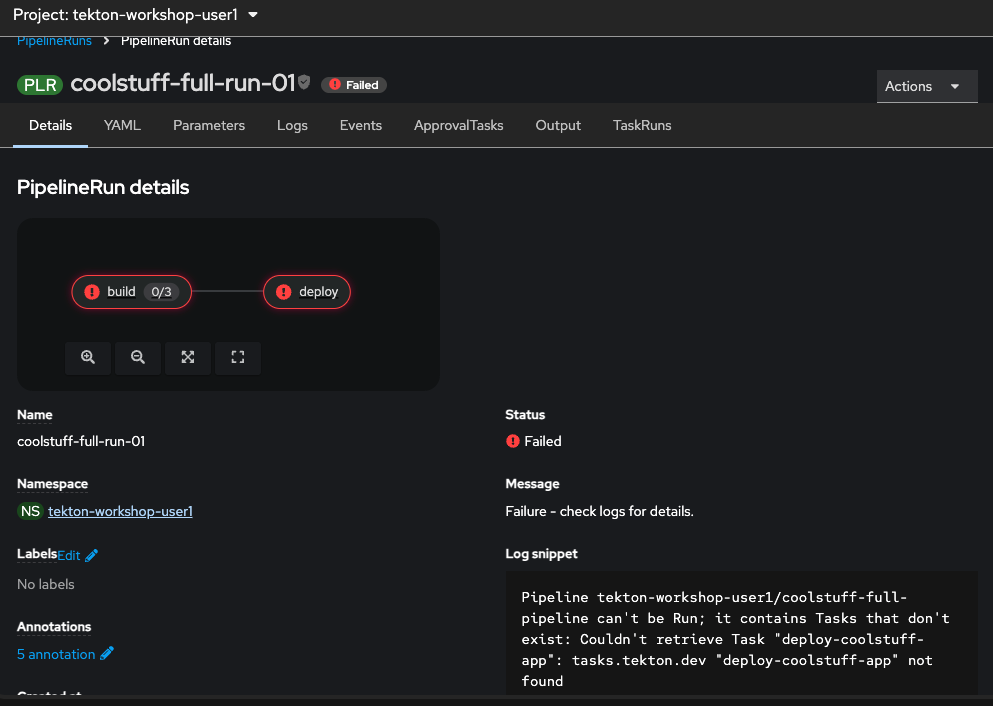
View the console failure view. In the OpenShift console, navigate to Pipelines, then PipelineRuns and then click
coolstuff-full-run-01, thencoolstuff-full-run-01. The pipeline graph showsbuildanddeployin red.
Fix the missing Task and re-run
-
Create the missing
deploy-coolstuff-appTask:cat > deploy-coolstuff-task.yaml << 'EOF' apiVersion: tekton.dev/v1 kind: Task metadata: name: deploy-coolstuff-app spec: params: - name: app-name type: string description: Name of the application to deploy - name: app-version type: string description: Version of the application to deploy steps: - name: deploy image: registry.access.redhat.com/ubi9/ubi-minimal:latest script: | #!/usr/bin/env bash set -e echo "=== Deploying $(params.app-name) v$(params.app-version) ===" echo "Target namespace : tekton-workshop" echo "Image : coolstuff-registry/$(params.app-name):$(params.app-version)" echo "Deployment method : Rolling update" echo "" echo "Deployment complete. $(params.app-name) v$(params.app-version) is live." EOF -
Apply the Task:
oc apply -f deploy-coolstuff-task.yamlExpected output:
task.tekton.dev/deploy-coolstuff-app created
-
Confirm the Task now exists:
oc get task deploy-coolstuff-app -
Create a new PipelineRun to confirm the fix resolves the failure:
cat > coolstuff-run-fixed.yaml << 'EOF' apiVersion: tekton.dev/v1 kind: PipelineRun metadata: name: coolstuff-full-run-02 spec: pipelineRef: name: coolstuff-full-pipeline params: - name: app-name value: "coolstuff-store-checkout" - name: app-version value: "1.0.0" workspaces: - name: shared-data emptyDir: {} EOF -
Apply the fixed PipelineRun and follow the logs:
oc apply -f coolstuff-run-fixed.yaml && \
  tkn pipelinerun logs coolstuff-full-run-02 -f
Expected output:
[build : validate] === Validating coolstuff-store-checkout v1.0.0 ===
[build : validate] Workspace path: /workspace/source
[build : validate] Validation passed.
[build : test] === Running tests for coolstuff-store-checkout ===
[build : test] Continuing from: validate-complete
[build : test] All tests passed.
[build : package] === Packaging coolstuff-store-checkout v1.0.0 ===
[build : package] Continuing from: test-complete
[build : package] Package created: coolstuff-store-checkout-1.0.0.tar.gz
[deploy : deploy] === Deploying coolstuff-store-checkout v1.0.0 ===
[deploy : deploy] Target namespace  : tekton-workshop
[deploy : deploy] Image             : coolstuff-registry/coolstuff-store-checkout:1.0.0
[deploy : deploy] Deployment method : Rolling update
[deploy : deploy]
[deploy : deploy] Deployment complete. coolstuff-store-checkout v1.0.0 is live.
Verify
Confirm the fixed PipelineRun completed successfully:
tkn pipelinerun listExpected output:
NAME                         STARTED          DURATION   STATUS
coolstuff-full-run-02        30 seconds ago   35s        Succeeded
coolstuff-full-run-01        5 minutes ago    46s        Failed
coolstuff-pipeline-run-02    25 minutes ago   2m30s      Succeeded
...
tkn pipelinerun describe coolstuff-full-run-02 \
  -o jsonpath='{.status.conditions[0].reason}'&& echo
Expected output:
Succeeded
-
coolstuff-full-run-02showsSucceeded -
Both
buildanddeploytasks completed -
The failed
coolstuff-full-run-01remains in the list as a historical record
Module summary
Coolstuff Store’s team now has the full picture. Pipelines run automatically, and when they fail, there’s a clear path to the root cause: list runs, describe the failure, read the step logs, and fix the underlying issue.
What you accomplished:
-
Used
tkn pipelinerun listanddescribeto inspect both successful and failed runs -
Read the pipeline status conditions to identify the exact task and reason for failure
-
Used the OpenShift console pipeline graph to visualize which stages succeeded and which failed
-
Fixed a missing Task reference and confirmed recovery with a successful re-run
Key takeaways:
-
tkn pipelinerun describeis your first tool when a pipeline fails — it shows which task failed and its status reason in one command. -
tasks.tekton.dev "name" not foundmeans a Pipeline references a Task that hasn’t been created yet. Create the Task, then re-run. -
Tekton retains completed pods long enough to retrieve logs.
tkn pipelinerun logsworks even after a run finishes. -
The OpenShift console pipeline graph gives a faster visual overview than the CLI — use it for status at a glance, and the CLI for detailed diagnosis.
Learning outcomes
By completing this module, you should now understand:
-
How to use
tkn pipelinerun list,describe, andlogsto monitor pipeline health from the CLI -
How Tekton status conditions communicate failure reasons and which tasks are affected
-
The diagnostic pattern for a failed pipeline: list to spot the failure, describe to identify the task, logs to find the root cause
-
How incomplete Task definitions surface as runtime failures and how to resolve them by creating the missing Task before re-running
Next steps:
Conclusion and next steps summarizes the full workshop and provides resources for continuing your Tekton and OpenShift Pipelines journey.