Module 2: Creating Tasks and TaskRuns
In Module 1, you confirmed that Red Hat OpenShift Pipelines is running and created a simple single-step Task. Coolstuff Store’s manager was impressed with the quick demonstration, but now wants to see something closer to a real build workflow.
In this module, you’ll build a multi-step Task that simulates the validate, test, and package stages of a CI/CD pipeline. You’ll also learn how Workspaces allow steps within a Task to share data, which is essential for passing artifacts between pipeline stages.
Learning objectives
By the end of this module, you’ll be able to:
-
Create a Tekton Task with multiple steps and Parameters
-
Explain the role of Parameters in making Tasks reusable across applications
-
Configure a Workspace on a Task to share data between steps
-
Bind a Workspace to a PersistentVolumeClaim (PVC) in a TaskRun
Exercise 1: Create a multi-step Task with Parameters
You’ll create a Task called build-coolstuff-app that simulates the 3-stage build workflow Coolstuff Store needs: validate, test, and package. Using Parameters means the same Task definition can run for any application and version without modification.
-
In the Terminal tab, confirm you are in the correct project:
oc project tekton-workshop-%OPENSHIFT_USERNAME%Expected output:
Now using project "tekton-workshop-%OPENSHIFT_USERNAME%" on server "...".

or

Already on project "tekton-workshop-%OPENSHIFT_USERNAME%" on server ...
-
Create the Task definition file:
cat > build-coolstuff-task.yaml << 'EOF' apiVersion: tekton.dev/v1 kind: Task metadata: name: build-coolstuff-app spec: params: - name: app-name type: string default: "coolstuff-store-app" description: Name of the application to build - name: app-version type: string default: "1.0.0" description: Version of the application to build workspaces: - name: source description: Shared workspace for passing data between build stages steps: - name: validate image: registry.access.redhat.com/ubi9/ubi-minimal:latest script: | #!/usr/bin/env bash set -e echo "=== Validating $(params.app-name) v$(params.app-version) ===" echo "Workspace path: $(workspaces.source.path)" echo "validate-complete" > $(workspaces.source.path)/stage.txt echo "Validation passed." - name: test image: registry.access.redhat.com/ubi9/ubi-minimal:latest script: | #!/usr/bin/env bash set -e echo "=== Running tests for $(params.app-name) ===" PREV=$(cat $(workspaces.source.path)/stage.txt) echo "Continuing from: $PREV" echo "test-complete" > $(workspaces.source.path)/stage.txt echo "All tests passed." - name: package image: registry.access.redhat.com/ubi9/ubi-minimal:latest script: | #!/usr/bin/env bash set -e echo "=== Packaging $(params.app-name) v$(params.app-version) ===" PREV=$(cat $(workspaces.source.path)/stage.txt) echo "Continuing from: $PREV" ARTIFACT="$(params.app-name)-$(params.app-version).tar.gz" echo "$ARTIFACT" > $(workspaces.source.path)/artifact.txt echo "Package created: $ARTIFACT" EOF -
Apply the Task:
oc apply -f build-coolstuff-task.yamlExpected output:
task.tekton.dev/build-coolstuff-app created
-
Inspect the Task structure using the Tekton CLI:
tkn task describe build-coolstuff-appExpected output includes:
Name:        build-coolstuff-app

Params
 NAME          TYPE     DEFAULT
 app-name      string   coolstuff-store-app
 app-version   string   1.0.0

Workspaces
 NAME     DESCRIPTION
 source   Shared workspace for passing data between build stages

Steps
 NAME       IMAGE
 validate   registry.access.redhat.com/ubi9/ubi-minimal:latest
 test       registry.access.redhat.com/ubi9/ubi-minimal:latest
 package    registry.access.redhat.com/ubi9/ubi-minimal:latest
Verify
Confirm the Task is present and has the correct structure:
oc get task build-coolstuff-appExpected output:
NAME                  AGE
build-coolstuff-app   26s
-
Task name is
build-coolstuff-app -
tkn task describeshows 3 steps, 2 params, 1 workspace
Also check the new task in the OpenShift console, like you did in Module 1 - Exercise 2. Check in Pipelines then Tasks
Exercise 2: Create a PVC and run the Task
With the Task defined, you need to provide a storage backend for the Workspace. You’ll create a PersistentVolumeClaim (PVC) that gives the Task steps a shared filesystem, then create a TaskRun that binds the Workspace to that PVC.
-
Create a PVC definition:
cat > workshop-pvc.yaml << 'EOF' apiVersion: v1 kind: PersistentVolumeClaim metadata: name: workshop-pvc spec: accessModes: - ReadWriteOnce resources: requests: storage: 1Gi EOF -
Apply the PVC:
oc apply -f workshop-pvc.yamlExpected output:
persistentvolumeclaim/workshop-pvc created
-
Confirm the PVC is there:
oc get pvc workshop-pvcExpected output:
NAME           STATUS   VOLUME   CAPACITY   ACCESS MODES   STORAGECLASS   AGE
workshop-pvc   Pending    ...      1Gi        RWO            ...            10s
OpenShift uses dynamic storage provisioning. The PVC moves from PendingtoBoundautomatically once storage is allocated/used. -
Create a TaskRun that binds the Workspace to the PVC:
cat > build-taskrun-01.yaml << 'EOF' apiVersion: tekton.dev/v1 kind: TaskRun metadata: name: build-coolstuff-run-01 spec: taskRef: name: build-coolstuff-app params: - name: app-name value: "coolstuff-store-frontend" - name: app-version value: "2.1.0" workspaces: - name: source persistentVolumeClaim: claimName: workshop-pvc EOF -
Apply the TaskRun:
oc apply -f build-taskrun-01.yamlExpected output:
taskrun.tekton.dev/build-coolstuff-run-01 created
-
Now check the PVC again:
oc get pvc workshop-pvcExpected output:
NAME           STATUS   VOLUME                                     CAPACITY   ACCESS MODES   STORAGECLASS   VOLUMEATTRIBUTESCLASS   AGE
workshop-pvc   Bound    pvc-d6f95e1a-2d50-4928-8f52-9b57f649c9bd   1Gi        RWO            gp3-csi        <unset>                 37s
-
Follow the logs until the TaskRun completes:
tkn taskrun logs build-coolstuff-run-01 -fExpected output:
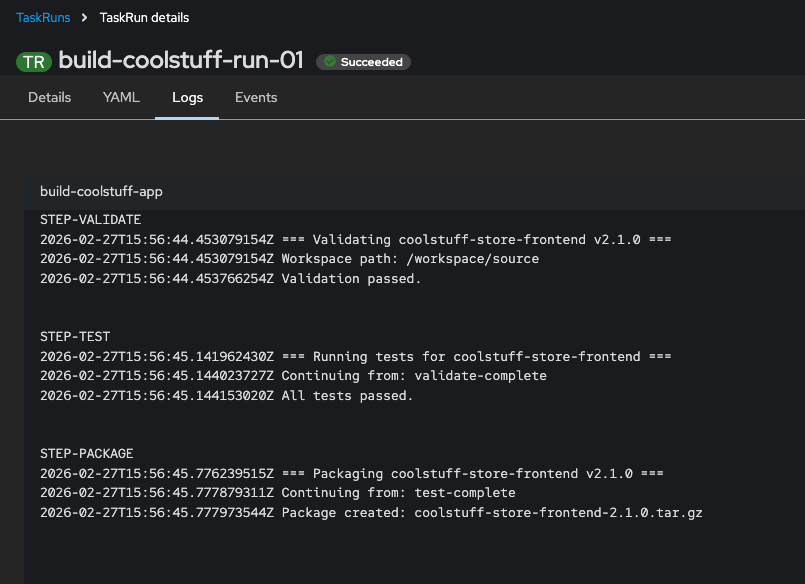
[validate] === Validating coolstuff-store-frontend v2.1.0 ===
[validate] Workspace path: /workspace/source
[validate] Validation passed.
[test] === Running tests for coolstuff-store-frontend ===
[test] Continuing from: validate-complete
[test] All tests passed.
[package] === Packaging coolstuff-store-frontend v2.1.0 ===
[package] Continuing from: test-complete
[package] Package created: coolstuff-store-frontend-2.1.0.tar.gz
The
-fflag follows the log stream and returns to the prompt when the TaskRun finishes. -
View the TaskRun detail in the OpenShift console.
-
Navigate to Pipelines, then Tasks. In the central view Click TaskRuns to see the different executions of tasks.
-
Click
build-coolstuff-run-01to see an overview with the statusSucceeded, then click the Logs tab to see the log output from the task run.
-
Verify
Confirm all 3 steps completed and the TaskRun succeeded:
oc get taskrun build-coolstuff-run-01 \
  -o jsonpath='{.status.conditions[0].reason}'&& echo
Expected output:
Succeeded
oc get taskrun build-coolstuff-run-01 \
  -o jsonpath='{.status.steps[*].name}'&& echo
Expected output:
validate test package
-
Status reason is
Succeeded -
All 3 step names are present
-
Log output shows each step reading data written by the previous step
Exercise 3: Reuse the Task with different parameters
One of the main reasons to define Tasks separately from TaskRuns is reusability. The same build-coolstuff-app Task can build any application at any version by providing different parameters. In this exercise, you’ll run a second TaskRun for a different Coolstuff Store service.
| Both TaskRuns in this exercise use the same PVC, so run them sequentially. The first TaskRun must finish before you start the second, because a ReadWriteOnce PVC can only be mounted by 1 pod at a time. |
-
Create a second TaskRun with different parameter values:
cat > build-taskrun-02.yaml << 'EOF' apiVersion: tekton.dev/v1 kind: TaskRun metadata: name: build-coolstuff-run-02 spec: taskRef: name: build-coolstuff-app params: - name: app-name value: "coolstuff-store-backend" - name: app-version value: "1.5.3" workspaces: - name: source persistentVolumeClaim: claimName: workshop-pvc EOF -
Apply the second TaskRun:
oc apply -f build-taskrun-02.yaml -
Follow the logs:
tkn taskrun logs build-coolstuff-run-02 -fExpected output:
[validate] === Validating coolstuff-store-backend v1.5.3 ===
[validate] Workspace path: /workspace/source
[validate] Validation passed.
[test] === Running tests for coolstuff-store-backend ===
[test] Continuing from: validate-complete
[test] All tests passed.
[package] === Packaging coolstuff-store-backend v1.5.3 ===
[package] Continuing from: test-complete
[package] Package created: coolstuff-store-backend-1.5.3.tar.gz
-
List all TaskRuns in the project:
tkn taskrun listExpected output:
NAME                      STARTED         DURATION   STATUS
build-coolstuff-run-02    30 seconds ago  15s        Succeeded
build-coolstuff-run-01    2 minutes ago   18s        Succeeded
hello-coolstuff-run-01    10 minutes ago  12s        Succeeded
Verify
In the OpenShift Console, confirm both TaskRuns succeeded using the same Task.
-
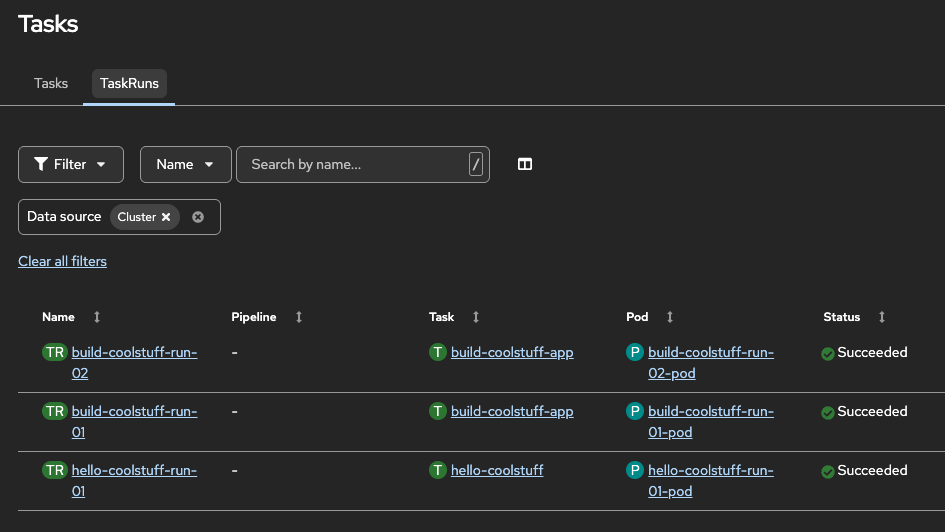
View the TaskRuns list in the OpenShift console under Pipelines, then Tasks.
-
Both TaskRuns reference the same underlying Task > build-coolstuff-app.
-
|
Note that the two different TaskRuns ran in different pods |
Module summary
Coolstuff Store’s manager can now see a recognizable CI/CD flow: validate, test, and package, running automatically for any service. You’ve also shown that 1 Task definition is enough to build the entire service portfolio, just by changing parameters.
-
Both
build-coolstuff-run-01andbuild-coolstuff-run-02showSucceeded -
Each TaskRun used the same
build-coolstuff-appTask definition -
Each TaskRun produced a different artifact name based on the parameters supplied
What you accomplished:
-
Created a Tekton Task with 3 steps, 2 Parameters, and 1 Workspace
-
Created a PVC and bound it to the Task through a TaskRun
-
Confirmed data flows between steps via the shared Workspace
-
Ran the same Task twice with different parameters to demonstrate reusability
Key takeaways:
-
Steps in a Task run sequentially and share data through Workspaces.
-
Parameters make Tasks reusable. TaskRuns supply the runtime values.
-
Workspaces decouple storage configuration from Task definitions.
-
In Module 3, you’ll chain Tasks like these into a Pipeline that orchestrates a full CI/CD workflow.
Learning outcomes
By completing this module, you should now understand:
-
How multiple steps within a Task run sequentially and share data through a Workspace
-
The role of Parameters in making Tasks reusable without modifying the Task definition
-
How Workspaces decouple storage configuration from Task logic, allowing the same Task to run in different environments
-
The pattern of defining a Task once and executing it many times with different TaskRuns, which is the foundation of scalable CI/CD automation
Next steps:
Module 3: Building your first pipeline chains the Tasks you’ve written into an end-to-end Pipeline and runs it against Coolstuff Store’s Gitea repository.