Module 1: Tekton fundamentals
Coolstuff Store’s engineering team is under pressure. Deployments are manual, slow, and inconsistent, and your manager has given you 2 hours to demonstrate that Red Hat OpenShift Pipelines can solve this problem.
Before building pipelines, you need to understand the core building blocks. In this module, you’ll explore Tekton, the open source framework that powers Red Hat OpenShift Pipelines, and learn how its components fit together. By the end, you’ll have run your first Tekton Task and be ready to build complete pipelines in the modules that follow.
Learning objectives
By the end of this module, you’ll be able to:
-
Describe how Tekton components, including Tasks, Pipelines, and PipelineRuns, relate to each other
-
Navigate the Red Hat OpenShift Pipelines interface in the OpenShift web console
-
Create a Tekton Task using a YAML definition and the
ocCLI -
Execute a Task using a TaskRun and verify the results using logs
Creating your first Tasks

Red Hat OpenShift Pipelines is a cloud native CI/CD (Continuous Integration/Continuous Delivery) solution built on Tekton, an open source project under the Continuous Delivery Foundation. Tekton runs CI/CD workflows as Kubernetes-native resources, making pipelines portable, reproducible, and manageable alongside your application code.
-
Standard CI/CD pipeline definition based on Tekton
-
Build images with Kubernetes tools such as S2I, Buildah, Buildpacks, Kaniko, etc
-
Deploy applications to multiple platforms such as Kubernetes, serverless and VMs
-
Easy to extend and integrate with existing tools
-
Scale pipelines on-demand
-
Portable across any Kubernetes platform
-
Designed for microservices and decentralized teams
-
Integrated with the OpenShift Developer Console
Tekton provides Kubernetes-style resources for creating serverless CI/CD-style pipelines on Kubernetes.
The custom resources, or core building blocks, of Tekton and OpenShift Pipelines are:
-
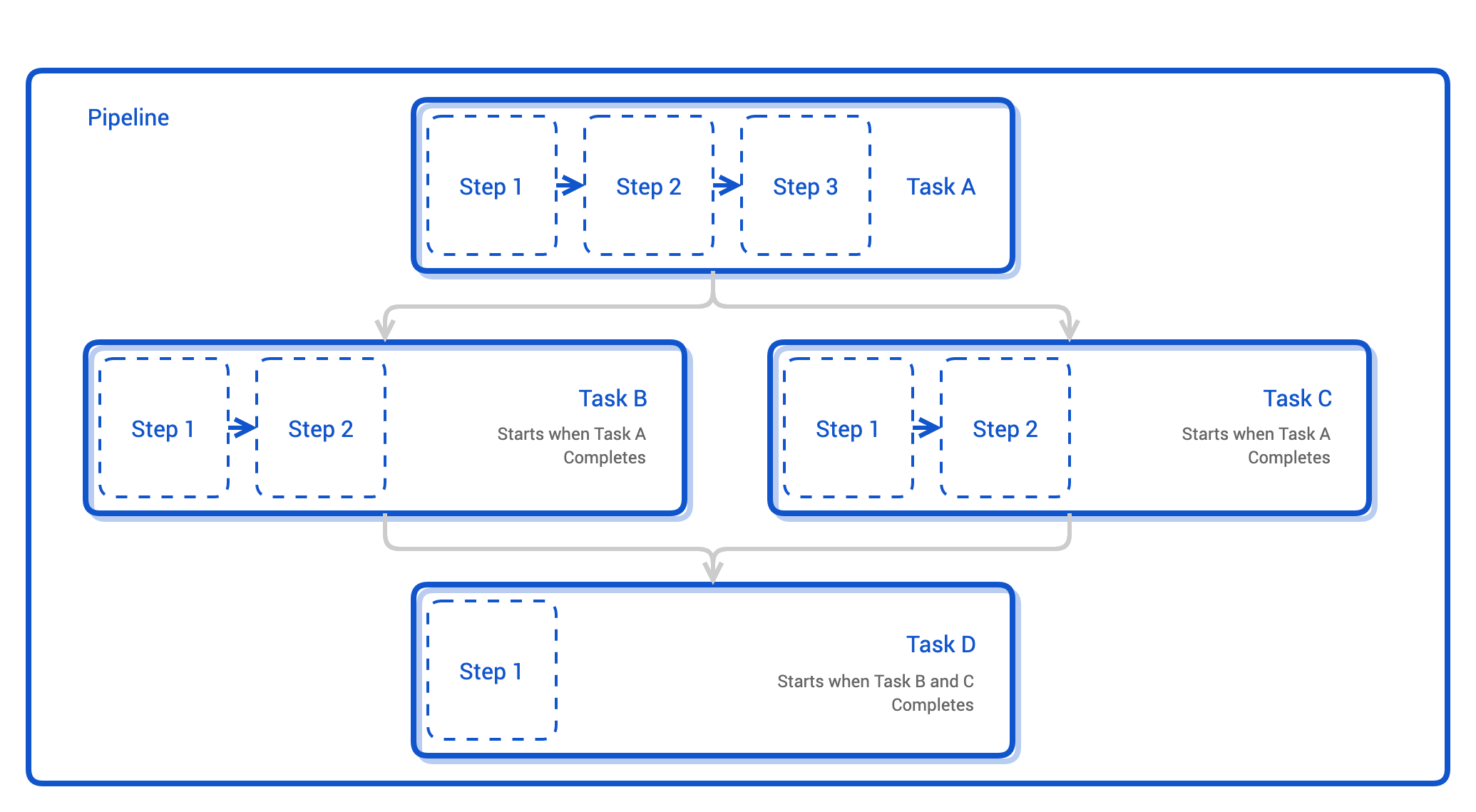
Step: A step is an operation in a CI/CD workflow, such as running some unit tests for a Python web app, or the compilation of a Java program. Tekton performs each step with a container image you provide. For example, you may use the official Go image to compile a Go program in the same manner as you would on your local workstation (go build).
-
Task - a reusable unit of work, containing 1 or more Steps running in order performing a specific task. Tekton runs a task in the form of a Kubernetes pod, each Step runs inside a container image. Examples include cloning a Git repository, building a container image, or running tests.
-
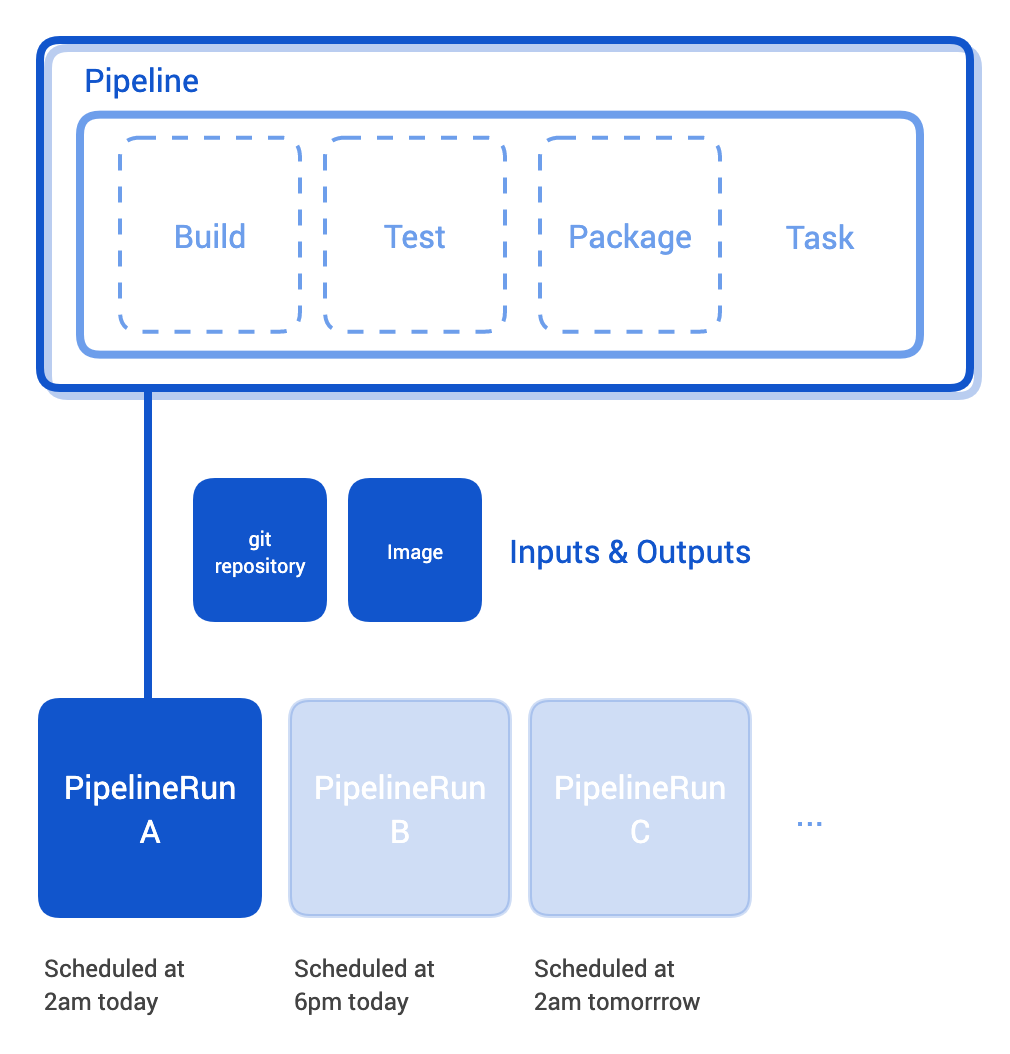
Pipeline - A collection of Tasks that forms a CI/CD workflow. Pipelines can run Tasks sequentially or in parallel and pass data between them using Workspaces and Parameters. The Pipeline is the definition of the pipeline and the Tasks that it should perform.
-
TaskRun - the result of a single execution of a Task. When you trigger a Task, Tekton creates a TaskRun resource that tracks the execution status and stores its output.
-
PipelineRun - A specific single execution of a Pipeline. A PipelineRun tracks the status of every Task in the Pipeline and stores the overall result. You can view the status of your CI/CD workflow, including the specifics of each task execution with pipelineRuns. A PipelineRun is the result of running an instance of Pipeline, which includes a number of TaskRun
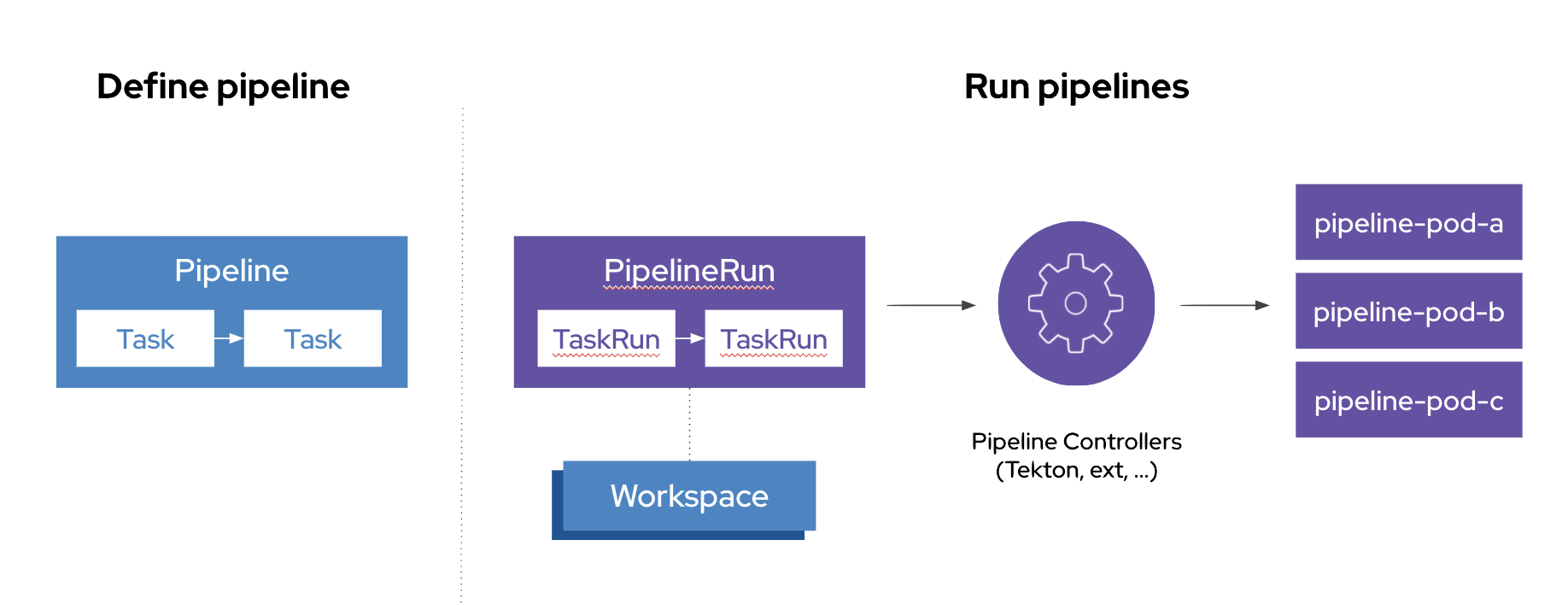
Related to these components we also have the following types:
-
Triggers - allows you to instantiate pipelines based on events. For example, you can trigger the instantiation and execution of a pipeline every time a PR is merged against a GitHub repository. You can also build a user interface that launches specific Tekton triggers.
-
Workspaces - Workspaces are similar to Volumes, they allow a Task to store inputs and/or outputs, share data between Tasks etc.
-
…and more
Exercise 1: Log in and explore your environment
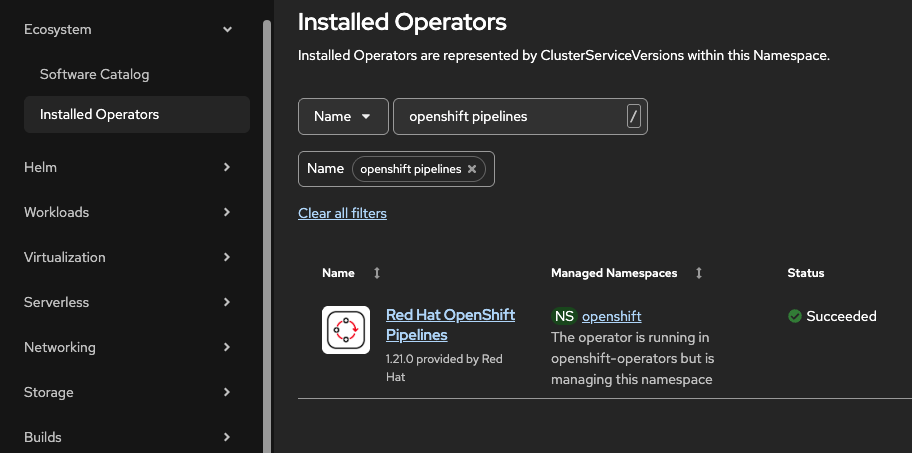
Coolstuff Store’s OpenShift cluster has Red Hat OpenShift Pipelines 1.21 pre-installed. Your first task is to confirm the installation and get familiar with the Pipelines interface before you start building.
|
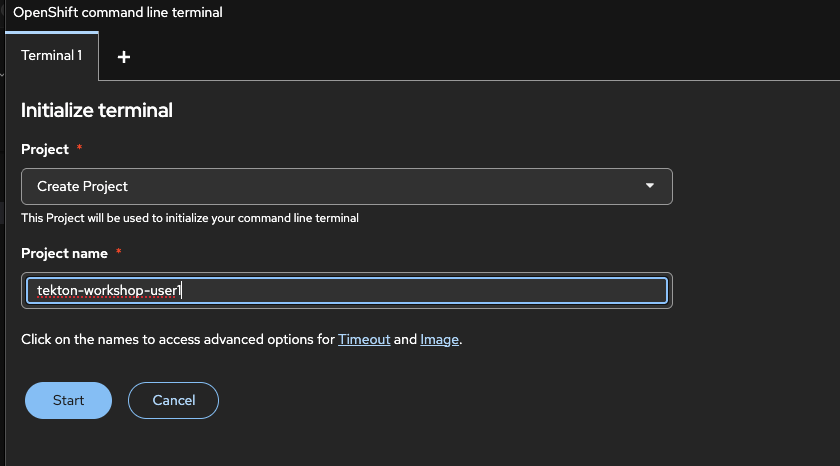
You should already have logged in to the OpenShift Web Console, as well as have opened the OpenShift Web Terminal. If you have done that, skip down to The OpenShift Web Console. Otherwise follow the steps here:
|


The OpenShift Web Console
The Red Hat OpenShift Container Platform web console is a graphical user interface accessible via a web browser that allows developers and administrators to visualize, browse, and manage project contents, cluster inventory, and resources.
The Web Console is governed by RBAC, meaning you can only view and interact with resources for which you have the appropriate permissions.
-
When first logged in you will see an overview. The overview lists details on the current OpenShift project you are in. It shows details on your workloads in it. At the moment it is empty but this we will change during the course of this workshop.
-
In the left navigation menu, click Pipelines and then Pipelines again. This menu confirms that OpenShift Pipelines is active in your cluster. The list is empty for now and
No Pipelines foundis shown in the main view. You’ll populate it in the next exercises.
Exercise 2: Create your first Task
Now that OpenShift Pipelines is confirmed, you’ll create your first Tekton Task. This Task prints a custom message to demonstrate the structure of a Task definition. Building simple Tasks first gives you a foundation before you write more complex ones in Module 2.
We will start with using the Web Terminal, so switch to the terminal window.
Verify you are still logged in on OpenShift
oc whoamiExpected output:
%OPENSHIFT_USERNAME%
| If not logged in, go back to the previous page and run the oc login command again. |
Start creating Tasks
-
Create the Task definition file:
cat > hello-task.yaml << 'EOF' apiVersion: tekton.dev/v1 kind: Task metadata: name: hello-coolstuff spec: params: - name: message type: string default: "Hello from Coolstuff Store!" description: The message to print steps: - name: print-message image: registry.access.redhat.com/ubi9/ubi-minimal:latest script: | #!/usr/bin/env bash echo "$(params.message)" echo "Red Hat OpenShift Pipelines is running!" date EOF -
Apply the Task to your cluster:
oc apply -f hello-task.yamlExpected output:
task.tekton.dev/hello-coolstuff created
-
Verify the Task was created:
oc get tasksExpected output:
NAME               AGE
hello-coolstuff    10s
Verify
Inspect the Task definition to confirm it was stored correctly:
oc describe task hello-coolstuff-
Task name is
hello-coolstuff -
1 step named
print-message -
1 param named
messagewith a default value
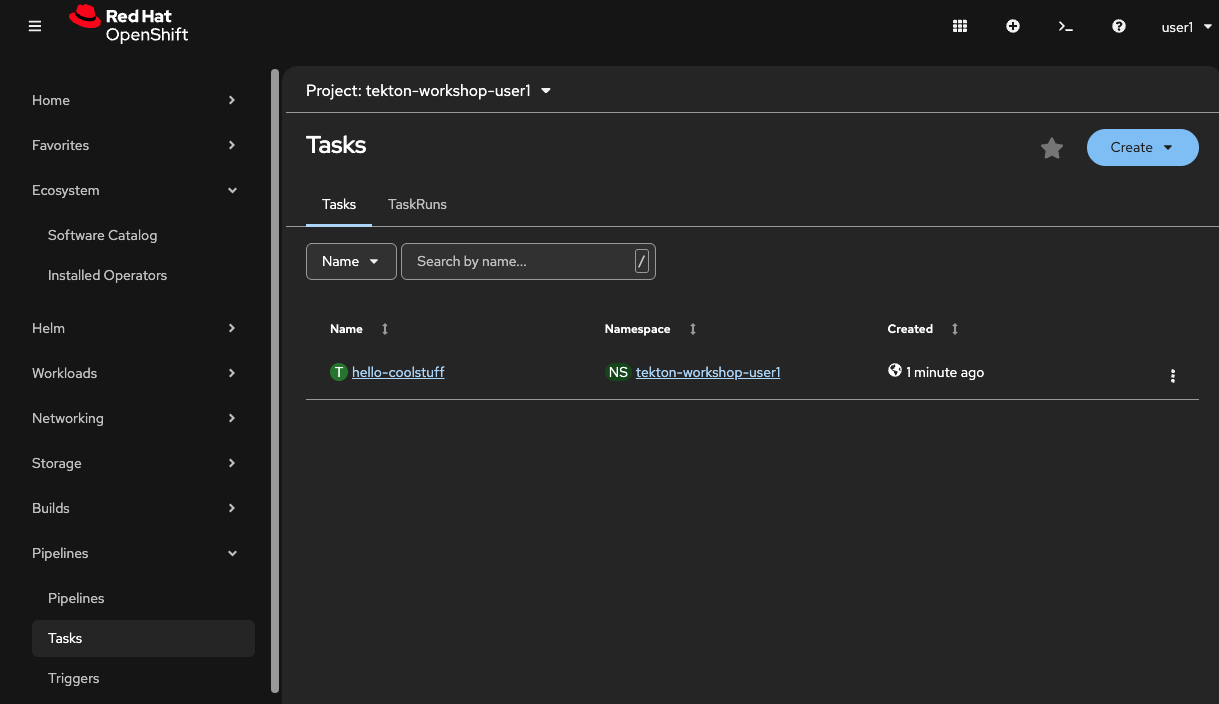
Verify in the OpenShift console that you can see the same Task.
Click on Pipelines in the left hand menu, then click Tasks and a list of tasks will be shown in the center view. At the moment we only have one task as shown below.
Exercise 3: Run your Task with a TaskRun
Defining a Task tells Tekton what to do. To actually execute it, you create a TaskRun. In this exercise, you’ll trigger the hello-coolstuff Task, inspect the execution status, and view the output logs.
-
Create a TaskRun definition that references your Task:
cat > hello-taskrun.yaml << 'EOF' apiVersion: tekton.dev/v1 kind: TaskRun metadata: name: hello-coolstuff-run-01 spec: taskRef: name: hello-coolstuff params: - name: message value: "Coolstuff Store CI/CD is ready!" EOF -
Apply the TaskRun to trigger execution:
oc apply -f hello-taskrun.yamlExpected output:
taskrun.tekton.dev/hello-coolstuff-run-01 created
-
Watch the TaskRun status in real time:
oc get taskrun hello-coolstuff-run-01 -wExpected output (wait a few seconds until status updates):
NAME                       SUCCEEDED   REASON      STARTTIME   COMPLETIONTIME
hello-coolstuff-run-01     True        Succeeded   30s         5s
Press
Ctrl+Cto stop watching once the status showsSucceeded. -
View the execution logs using the Tekton CLI:
tkn taskrun logs hello-coolstuff-run-01Expected output:
[print-message] Coolstuff Store CI/CD is ready!
[print-message] Red Hat OpenShift Pipelines is running!
[print-message] Thu Feb 26 00:00:00 UTC 2026
-
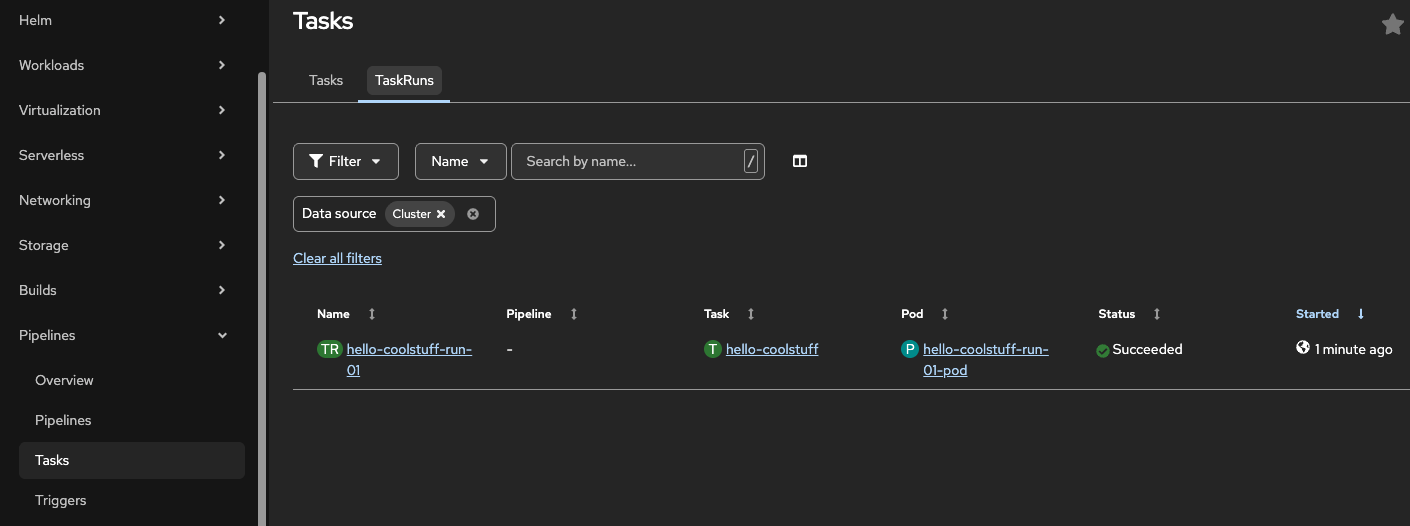
View the TaskRun in the OpenShift console.
-
Navigate to Pipelines, then Tasks and in the central view click TaskRuns. In the central view you can now see the status(Succeeded) and more details of your TaskRun.
-
Click
hello-coolstuff-run-01if you want to look at even more details.
-
Verify
Confirm the TaskRun completed with a Succeeded status:
oc get taskrun hello-coolstuff-run-01 \
  -o jsonpath='{.status.conditions[0].reason}'
Expected output:
Succeeded
-
Status reason is
Succeeded -
Logs contain your custom message
Coolstuff Store CI/CD is ready! -
COMPLETIONTIMEis populated in the TaskRun
Module summary
You’ve completed the Tekton fundamentals module. Coolstuff Store now has a verified Red Hat OpenShift Pipelines installation, and you’ve run your first Task.
What you accomplished:
-
Confirmed Red Hat OpenShift Pipelines 1.21 is installed and operational
-
Created a Tekton Task with a parameter and a custom step
-
Executed the Task using a TaskRun and reviewed the output logs
-
Navigated the Pipelines interface in both the CLI and the OpenShift console
Key takeaways:
-
Tasks define what to do. TaskRuns execute them. This separation makes Tasks reusable.
-
All Tekton resources are standard Kubernetes objects, so you manage them with
ocortkn. -
The OpenShift console provides a visual view of pipeline runs alongside the CLI.
-
Pipelines chain Tasks into a complete workflow. You’ll build one in Module 3.
Learning outcomes
By completing this module, you should now understand:
-
How Tekton Tasks encapsulate reusable CI/CD steps and execute as Kubernetes pods
-
The relationship between a Task and a TaskRun: the Task defines what to do, the TaskRun executes it
-
How to create and manage Tekton resources using the
ocandtknCLIs and the OpenShift console -
Why cloud native CI/CD built on Kubernetes primitives provides better portability and consistency than manual deployment processes
Next steps:
Module 2: Creating Tasks and TaskRuns builds on this foundation by creating Tasks with Workspaces and Parameters that pass data between steps.